Arcane COD for Warzone, Black Ops 7
Arcane COD — Warzone and Black Ops 7 cheat with Aimbot and ESP
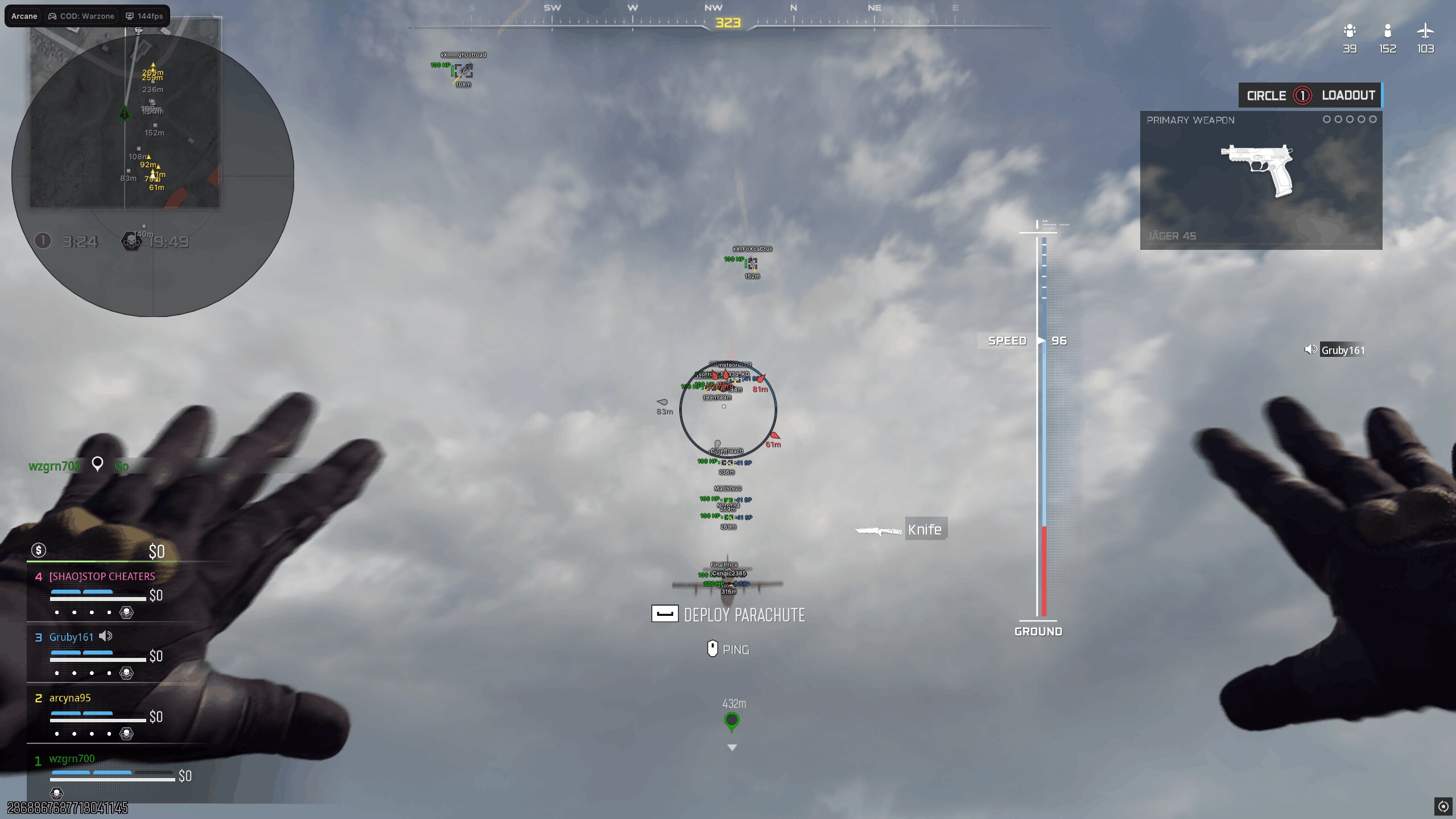
Arcane COD is private PC software for Call of Duty: Warzone and Black Ops 7 with an aimbot, player and world ESP, radar, off-screen indicators and config profiles. Laptops are not supported. Third-party software always carries an account-restriction risk.
The developer reported UNDETECTED status on 27 September 2026. Status can change after a game update; check the current state before launch.
System Requirements
🔔 Cheat statuses update automatically from our Telegram bot via developer notifications — follow the news there. Many cheats update themselves after game changes, so a “Checking” status does not mean the cheat is broken — it is just uncertainty until confirmed. Not sure? Ask in the site chat or on our Contacts page.
Global keys — work worldwide.
Payment with a Binance card may be available for selected products. Contact us privately before buying to check availability and agree the details.
Features
Aimbot
- Vector or Silent aim type
- Always-on or hold-key mode
- Targets: players, bots, knocked players or teammates
- Selected, closest or random bone; head, neck, chest, pelvis and other bones
- Movement prediction and humanization
- Recoil control system
- FOV circle and background, FOV size, smoothing and target-switch delay
- Visibility check and maximum distance
Radar
- Enemies, teammates, bots, knocked players and items
- Position and size controls
- Distance display
Battle mode
- Configurable keybind
- Hide players, items, world items, radar or off-screen indicators
Settings and configs
- Menu and unload keys
- DPI scale, VSync, dark or light theme and watermark
- Menu languages: EN, RU and CH
- Create, load, save, rename, share and remove configs
Player ESP
- Regular or corner bounding box with solid or gradient fill
- Skeleton with thickness and head-circle controls
- View line and line to enemy
- Health and shield bars
- Nicknames, held weapon, team name and distance
- Team colors, knocked-player and bot display
- Visibility check and maximum distance
World ESP
- Distance, transparency and maximum-distance controls
- Weapons and chests by rarity: Common, Uncommon, Rare, Epic and Legendary
- Dropped items, ammo, armor, equipment and money
Off-screen
- Enemies, teammates, bots and knocked players
- Position and radius controls
- Distance display
What's new in this cheat
3
New features, meaningful improvements and important fixes for this product.
-
Targets · Armor Plates · World ESP
Archived announcement. The date records the changes; the exact build date is unknown.
- Switch delay: wait 0–5000 ms after losing a target before selecting the next player; Aim releases immediately when the target dies; Aim releases immediately on knockdown when knocked players are filtered out; Weapon sway compensation adjusts the aim point for crosshair sway
- Armor Plates above the ESP box show the number of plates carried; Armor Satchel icon appears next to the plates when more than 5 plates are carried
- Weapon class filter: AR, BR, SMG, Shotgun, LMG, Marksman, Sniper, Pistol, Launcher, Melee, Special; Class tag before the weapon name, for example [AR] or [Sniper]
Detection fixes and World ESP tab organization
Archived announcement. The date records the changes; the exact build date is unknown.
- Fixed knocked player detection
- Fixed bot detection (Draw bots)
- The menu is now split into tabs: General, Weapons, Chests, Other
- Added ammo by type: AR, Pistol / SMG, Sniper, Shotgun, Rockets, each with its own toggle and color
Player and Loot ESP Additions
Archived announcement. The date records the changes; the exact build date is unknown.
- Added the platform above the box: Steam, Battle.net, Xbox, and others.
- Added the player level above the box.
- Added a Kills / Deaths / Assists line under the box.
- Added ESP feature: Weapon in hands.
- Fixed weapon rarity for loot that was missing it.
Customer Reviews
All reviewsFrequently Asked Questions
What features are included in Arcane COD?
What payment methods are accepted?
How to contact support?
Payment is confirmed, but the product is missing. How long should I wait?
I have a key. Where are the download and instructions?
After payment you will receive detailed instructions on activation, launch and use of the software.
Instructions will be sent to the email address specified before payment.
You will also find a download link and necessary components for the software.
Cheat community
Cheat updates, detection status and help from other players — in our Telegram and Discord.