Mason for ARC Raiders
Buy Mason cheat for ARC Raiders — Aimbot, ESP, Battle Mode
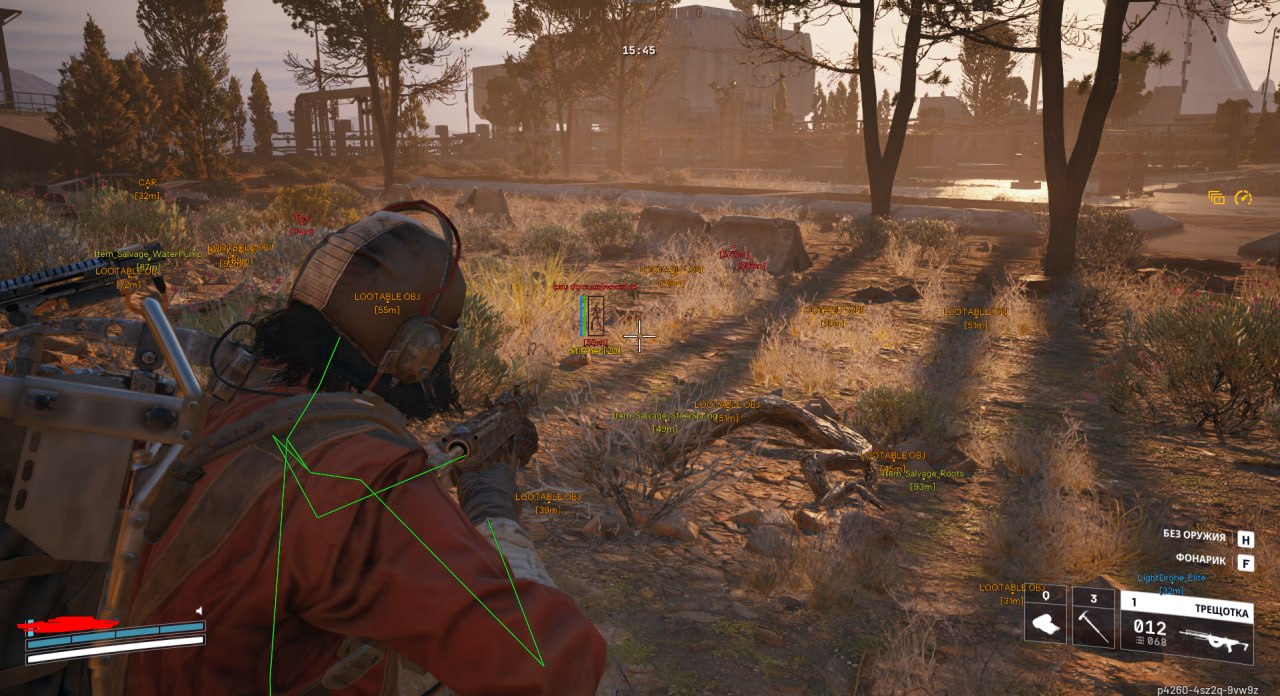
We're glad to present our new product for ARC Raiders — Mason, an external tool built with a focus on stability, performance and ease of use. An advanced Aimbot with Prediction, RCS and a Safe Preset, an informative ESP (players, health, armor, weapon, ammo count and skeletons), Visible Check for spotting visible targets, display of items, drones and other world objects, plus a handy Battle Mode for quickly switching between resource gathering and combat. Windows 10/11 x64 support, BattlEye anti-cheat.
System Requirements
🔔 Cheat statuses update automatically from our Telegram bot via developer notifications — follow the news there. Many cheats update themselves after game changes, so a “Checking” status does not mean the cheat is broken — it is just uncertainty until confirmed. Not sure? Ask in the site chat or on our Contacts page.
Global keys — work worldwide.
Payment with a Binance card may be available for selected products. Contact us privately before buying to check availability and agree the details.
Features
VISUALS
- Local Skeleton / Display the local player's skeleton
- Enemy Box / Draw a box around the enemy
- Enemy Armor / Show the enemy's armor level
- Enemy HP / Show the enemy's current health
- Enemy Skeleton / Show the enemy's skeleton
- Show Knocked / Show knocked-down enemies
- Visible Check / Check enemy visibility
- Enemy Weapon Name / Show the enemy's equipped weapon
- Enemy Ammo Count / Show the rounds in the enemy's magazine
WORLD
- Items / Show items on the map
- Drones / Show drones and hostile creatures
AIMBOT
- Enabled / Enable the Aimbot
- Aim Key / Bind the Aimbot activation key
- FOV / Adjust the Aimbot range
- Show FOV Circle / Draw the Aimbot range circle
- Smooth / Adjust aim smoothness
- Hitbox Selection / Select the target body part
- Safe Preset / Safe Aimbot settings to reduce detection risk
- Prediction / Target movement prediction for more accurate aim
- RCS / Adjust the weapon recoil compensation strength
BATTLE MODE
- Battle Mode Key / Bind the Battle Mode activation key
- Hide Drones / Hide drones during combat
- Hide Items / Hide items during combat
* The program's functionality may change at any time at the developer's discretion, but we always strive to keep this information up to date
What's new in this cheat
1
New features, meaningful improvements and important fixes for this product.
Freecamera added
Archived announcement. The date records the changes; the exact build date is unknown.
- Freecamera / free camera: A new function for freely moving the camera has been added
Customer Reviews
All reviewsFrequently Asked Questions
What features are included in Mason?
What payment methods are accepted?
How to contact support?
Payment is confirmed, but the product is missing. How long should I wait?
I have a key. Where are the download and instructions?
After payment you will receive detailed instructions on activation, launch and use of the software.
Instructions will be sent to the email address specified before payment.
You will also find a download link and necessary components for the software.
Cheat community
Cheat updates, detection status and help from other players — in our Telegram and Discord.