Phoenix Full for Rust Alkad
Buy Phoenix Full for Rust Alkad — Aimbot, ESP/WallHack, Night Vision
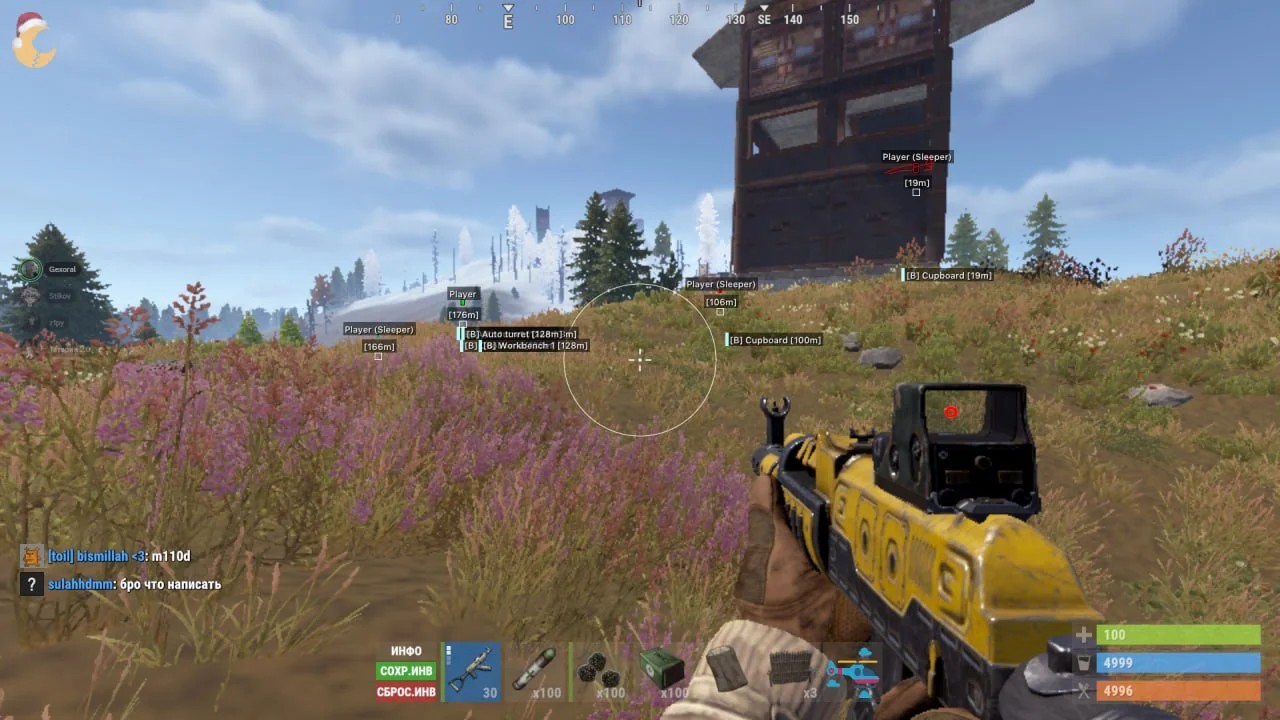
Phoenix Alkad Full is the complete version of the Phoenix cheat, specially adapted for the Alkad client of Rust. The software got an updated and improved menu plus a more convenient and logical configuration system, which makes it comfortable even for newcomers.
This version comes with a simple, clear aimbot configuration. On top of it: no recoil, no weapon sway, instant Eoka/bow shot and automatic pistol fire. Together these increase combat efficiency while keeping a careful, low-profile playstyle.
ESP / WallHack is implemented at a high level and covers nearly every important object in Rust: players, resources, ores, vehicles, raid elements, crates, barrels and buildings. A Night Vision option turns night into a bright, readable scene without losing visual quality.
Phoenix Alkad Full contains no overt rage features, which makes it an excellent choice for legit, low-risk play. Menu available in Russian and English.
System Requirements
🔔 Cheat statuses update automatically from our Telegram bot via developer notifications — follow the news there. Many cheats update themselves after game changes, so a “Checking” status does not mean the cheat is broken — it is just uncertainty until confirmed. Not sure? Ask in the site chat or on our Contacts page.
Global keys — work worldwide.
Payment with a Binance card may be available for selected products. Contact us privately before buying to check availability and agree the details.
Features
Aimbot
- Aimbot Enabled — enable / disable aimbot
- Aimbot FOV — area size within which aimbot locks targets
- Aimbot Smoothness — smoothing of aim onto a target
- Aimbot Type — aimbot type, e.g. vector
- Key — hold key to activate aimbot
- No Recoil — removes weapon recoil entirely
- No Sway — disables weapon sway while aiming
- Automatic Pistol — fires the pistol in full-auto mode
- Insta Eoka — instant Eoka shot without delay
NPC ESP
- Enabled — enable WH on NPC (bots)
- Visible Check — different colors for visible / occluded bots
- Show Sleepers — show inactive NPC (if applicable)
- Show Belt — show bot belt
- Show Item in Hands — active item in NPC hands
- Boxes — boxes around NPC
- Filled Boxes — filled box background
- Box Type — box type (full / corners only)
- Skeleton — show NPC skeleton
- Chams — bright bot highlight through walls
- Distance — show distance to bots
- Max Distance — max render distance of bot ESP
Items & Objects ESP
- Enabled — enable item/loot display (per category)
- Filter — per-category filter for items shown
- Max Distance — render distance of item / loot / object ESP
- Ores — various ores (stone, metal, sulfur)
- Collectables — various pickable resources
- Crates / Barrels — show crates and barrels with loot
- Building — show placed objects (cupboard, workbench, furnaces, etc.)
- World Items — show items on the ground
- Vehicles — show various vehicles (boats, helis, motorbike, etc.)
Players ESP
- Enabled — enable player ESP
- Visible Check — different colors for visible vs occluded players
- Show Sleepers — show sleeping players
- Show Names — show player nicknames
- Show Belt — show belt contents (hotbar)
- Show Item in Hands — show item in hands
- Boxes — toggle boxes around players (color configurable)
- Filled Boxes — filled box background for better visibility
- Box Type — box type (full 2D, corners only)
- Skeleton — show player skeleton
- Chams — bright player-model highlight through walls
- Distance — show distance to player
- Max Distance — max render distance of player ESP
Animals ESP
- Enabled — enable / disable WH on animals
- Animals Filter — filter to display only selected animals
- Max Distance — max ESP range on animals
- Wolf — wolves
- Bear — bears
- Boar — boars
- Chicken — chickens
- Horse — horses
- Shark — sharks
- Stag — stags
Misc
- Radar — standalone radar window with objects and players
- Night Vision — night-vision mode for better visibility in the dark
- Custom ESP Colors — custom colors for main ESP elements (Box / Snapline / Skeleton / Names)
- Languages — menu supports two languages (Russian, English)
What's new in this cheat
1
New features, meaningful improvements and important fixes for this product.
Menu, radar and inventory updates
Archived announcement. The date records the changes; the exact build date is unknown.
- New menu look (RUST / ALKAD).
- Radar now works; filters added.
- Inventory panels added (Hand / Belt / Wear) with in-game item names.
Customer Reviews
All reviewsFrequently Asked Questions
What features are included in Phoenix Full?
What payment methods are accepted?
How to contact support?
Payment is confirmed, but the product is missing. How long should I wait?
I have a key. Where are the download and instructions?
After payment you will receive detailed instructions on activation, launch and use of the software.
Instructions will be sent to the email address specified before payment.
You will also find a download link and necessary components for the software.
Cheat community
Cheat updates, detection status and help from other players — in our Telegram and Discord.