Arcane for Sea of Thieves
Private cheat Arcane for the game Sea of Thieves
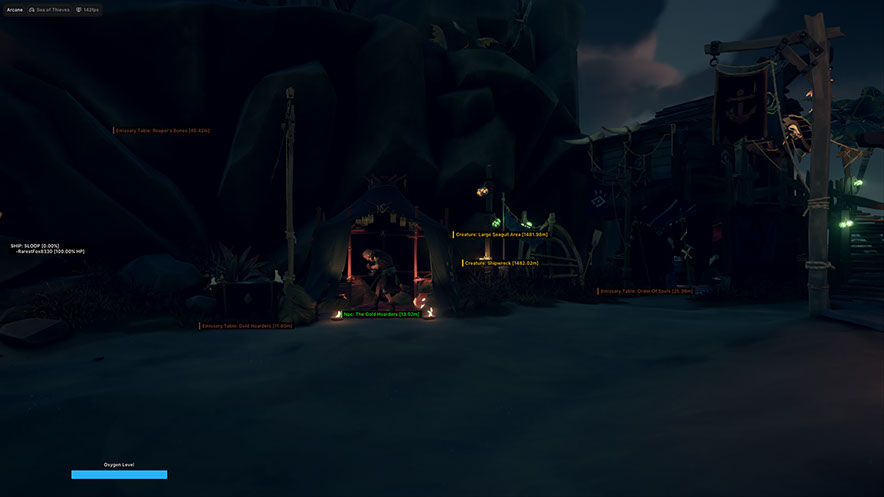
Arcane is a private cheat for Sea of Thieves that gives you complete situational awareness on sea and land. The software suits both aggressive PvP and relaxed farming — you will always know where enemies, loot and resources are.
At its core is a powerful ESP system. It covers nearly everything: players, NPCs, ships, items, resource barrels, animals, active events and even individual islands with filtering by sea region. You won't miss a treasure chest or an approaching enemy.
For PvP combat there is a flexible aimbot with fine-tuned smoothness and FOV settings, while cannon and harpoon trajectory visualization makes naval battles far more accurate — you'll land shots where you used to guess.
A convenient HUD displays crew information on the map, and the built-in configuration system lets you save settings and share them with friends via a unique key. The menu supports English, Russian and Chinese.
Includes an HWID Spoofer. Works with Steam and Xbox versions, Windows 10–11 (26H1, 26H2).
System Requirements
Global keys — work worldwide.
Payment with a Binance card may be available for selected products. Contact us privately before buying to check availability and agree the details.
Features
AIMBOT
- Enable - Activate
- Keybind - Activation key
- Aim Mode - Activation mode: (When held, Always)
- Selected Bone - Selected bone: (Head, Neck, Chest, Pelvis)
- Selected Target Type - Selected target type: (Selected bone, Nearest bone)
- Player lock - Holding a player
- Draw FOV Border - Draw a circle FOV
- Draw FOV Background - Draw the FOV background
- FOV Radius - FOV circle size
- Smooth Factor - Smoothness
- Max Distance - Maximum distance
Ships ESP
- Name - Name of the vessel
- Box Owned - Boxing your ship
- Box Enemy - Boxing enemy ships
- Box AI - Boxing ships bots
- Render Distance - Drawing distance
Other
- Merchant Commodity - Merchants
- Resource - Resources
- Quest Item - Quest items
- Fraction Flag - Faction Flags
- Raw Food - Raw foods
- Others - Other
- Render Distance - Maximum distance
Islands ESP
- Detailed filter with the ability to search and display all or only the required islands
gun
- Name - Name
- Trajectory Line - Projectile trajectory line
- Cannon Line - Cannon Line
- Cannon Circle - Impact Area
- Ship Ignore Distance - Distance to ignore ships
- Render Distance - Display distance
Barrel ESP
- Wood - Wood
- Food - Food products
- Cannonball - Cannonball
- Ordinary - Ordinary
- Render Distance - Display distance
Activates
- Event - Event
- Raid - Raid
- Creature - Creature
MISC
- FOV Changer - Changing the viewing angle
- Battle Mode - Battle mode
- Crosshair - Static crosshair
Hud
- Crews - List of crews on the map
- Oxygen - Oxygen (local player)
- Oxygen Style - Oxygen strip style: (Static, Value Based, Gradient)
- Oxygen Render Conditions - Oxygen display conditions: (Always, When not the full value)
Hovering
- Reduce Opacity when Hovered - Reduce opacity when hovering
- Hovering Radius - Cursor hover radius
- Show Circle - Show circle
Players ESP
- Bounding box - Boxing 2D: (Box, In the corners)
- Fill box - Box background: (Static, Gradient)
- Health Bar - Health bar
- Oxygen Bar - Air Strip
- Bars Render Conditions - Conditions for displaying bars: (Always, When not the maximum value)
- Nickname - Nicky
- Skeleton - Skeletons: (Thickness)
- View line - Line of sight: (Length of the line of sight)
AI ESP
- Bounding box - Boxing 2D: (Box, In the corners)
- Fill box - Box background: (Static, Gradient)
- Health Bar - Health bar
- Bars Render Conditions - Conditions for displaying bars: (Always, When not the maximum value)
- Nickname - Nicky
- Skeleton - Skeletons: (Thickness)
- View line - Line of sight: (Length of the line of sight)
Items ESP
- Chest - Chest
- Skull - Skull
- Gem - Precious stone
- Pouch - Pouch
- Gift - Gift
- Tome - Tom
- Special - Special
- Buried Treasure - Buried treasure
- Key - Key
Seas
- The Ancient Isles
- The Shores Of Planty
- The Wilds
- The Devil Roar
- No Mans Sea
- The Shores Of Gold
- Other
harpoon
- Name - Name
- Prediction Line -
- Harpoon Line -
- Harpoon Circle - Hit Area
- Render Distance - Display distance
Animal
- Friendly - Friendly
- Hostile - Hostile
- Render Distance - Display distance
Static Locations
- Emissary Table - Table
- Island -
SETTINGS
- Menu key - Activation key
- Unload key - Unload key
- DPI Scale - UI size
- VSync - Vertical Sync
- Theme - Theme: (Dark, Light)
- Watermark - Watermark
- Language - Language: (EN, RU, CH)
CONFIGURATIONS
- Create - Create
- Get shared - Get shared access (the ability to download your friend's configuration using a unique key)
- Launch - Launch
- Save - Save
- Edit name - Change name
- Share - Share
- Remove - Remove
What's new in this cheat
3
New features, meaningful improvements and important fixes for this product.
Item Categorization Reworked
Archived announcement. The date records the changes; the exact build date is unknown.
- Reworked item categorization for more intuitive filtering and future compatibility with newly added in-game items.
Fix for Aim in “On Hold” mode
Archived announcement. The date records the changes; the exact build date is unknown.
- Fixed Aim in “On Hold” mode.
Game platform detection fixed
Archived announcement. The date records the changes; the exact build date is unknown.
- Fixed game platform detection
Customer Reviews
All reviewsFrequently Asked Questions
What features are included in Arcane?
What payment methods are accepted?
How to contact support?
Payment is confirmed, but the product is missing. How long should I wait?
I have a key. Where are the download and instructions?
After payment you will receive detailed instructions on activation, launch and use of the software.
Instructions will be sent to the email address specified before payment.
You will also find a download link and necessary components for the software.
Cheat community
Cheat updates, detection status and help from other players — in our Telegram and Discord.