Sky Cheats for Escape from Tarkov
Buy a working private Sky cheat for the game Escape from Tarkov

System Requirements
🔔 Cheat statuses update automatically from our Telegram bot via developer notifications — follow the news there. Many cheats update themselves after game changes, so a “Checking” status does not mean the cheat is broken — it is just uncertainty until confirmed. Not sure? Ask in the site chat or on our Contacts page.
Global keys — work worldwide.
Payment with a Binance card may be available for selected products. Contact us privately before buying to check availability and agree the details.
Features
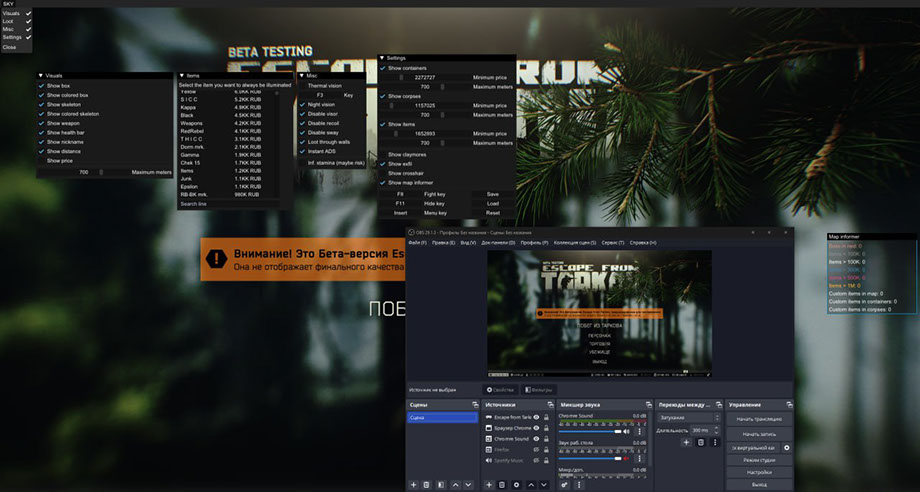
Player ESP (Wallhack)
- Player ESP — wallhack on players
- Box ESP — box-style wallhack
- Skeleton — skeleton wallhack
- Weapon — weapons held by players and bots
- HP Bar — health bar display
- Name ESP — player nicknames
- Distance — distance to targets
- Max Distance — limit wallhack range
- Visible Check — visibility check, different colors behind walls and in line of sight
- Bosses — show bosses
- Bots — show bots (NPC)
- Profile Info — player account info (game edition, stats, etc.)
- K / D — player kills / deaths
- Chams — full silhouette highlighting
- Direction of Gaze — show enemy view directions
- Radar — radar window with player positions and other info
Loot ESP (Items)
- Loot ESP — wallhack on loot
- Loot Filter — convenient loot filtering
- Search Loot by Name — search loot by name
- Price — show loot value
- Containers — show containers (type filters available)
- Corpses — player corpses
- Minimum / Maximum Price — min and max price of displayed items
- Map Informer — scans map (loot, bosses)
- Inventory Price — player inventory value
- Distance — distance to items
- Quest Items — mark quest items
- Quest Zones — mark quest zones
- Self Price — your own inventory value
Misc (Other Features)
- Thermal Vision — thermal vision mode
- Night Vision — night vision mode
- Disable Visor — remove helmet visor
- No Recoil — disable weapon recoil
- No Sway — disable weapon sway while moving
- Instant ADS — instant aim down sights
- Crosshair — static crosshair in center of screen
- Claymores — show mines
- Exits — show map exits
- Spoofer — built-in spoofer for HWID ban bypass
- CFG System — save and load settings
- Combat Mode — disables all ESP except players
- Binds — custom key bindings for cheat functions
- Kill Zone — show sniper zones
- Silent Loot — loot items at 2–3m distance (including through walls)
- Zoom Hack — zoom in without optics
- FOV Changer — increase field of view
- Time Changer — set any time of day
- Localizations — menu in Russian and English
- Custom Font — set any font for the cheat
- Disable Grass — remove grass and vegetation (FPS boost)
- FullBright — fully lit map without dark corners
- Clear Weather — remove weather effects
- Disable Shadows — remove shadows and occlusion
- Long Jump — increase jump distance
- No Inertia — remove movement inertia
- No Malfunctions — disable weapon jams and malfunctions
- Fast Mag Load/Unload — fast magazine loading/unloading
- No Screen Effects — disable screen effects (blood, shake, flashes, smoke)
What's new in this cheat
1
New features, meaningful improvements and important fixes for this product.
Custom-filter additions and rework
Archived announcement. The date records the changes; the exact build date is unknown.
- Chams for players have returned.
- Custom settings were added for each custom item in the filter, including color, size, name, custom distance, and price.
- A distance-ignore function was added for custom items.
- Category colors and settings can now be used in filters.
- Custom-filter settings saving was reworked with proper settings and filtering export/import; loot can be imported from authority.
Customer Reviews
All reviewsFrequently Asked Questions
What features are included in Sky Cheats?
What payment methods are accepted?
How to contact support?
Payment is confirmed, but the product is missing. How long should I wait?
I have a key. Where are the download and instructions?
After payment you will receive detailed instructions on activation, launch and use of the software.
Instructions will be sent to the email address specified before payment.
You will also find a download link and necessary components for the software.
Cheat community
Cheat updates, detection status and help from other players — in our Telegram and Discord.