SN External for Roblox
Buy Working External Cheat SN External for Roblox
SN External is a powerful external cheat for Roblox, built for those who want maximum functionality without risk or bloat.
The built-in aimbot with selectable aim method (mouse, camera, memory), FOV circle, smoothing and prediction is perfect for both PvP and farming. Wall, team, health and distance checks are available, plus flexible target and reaction settings.
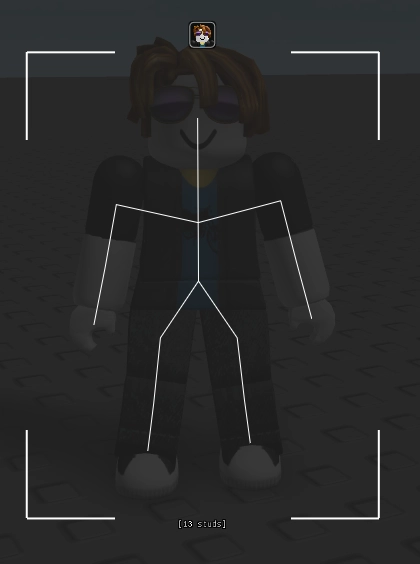
ESP visuals include boxes, skeletons, distance, health, names, weapons and even separate visual styles — from classic to "china hat" and 3D outlines. Render distance and color scheme are customizable to any taste.
Triggerbot with delay support, auto-release, raycast and hitbox modes gives even more combat control. Separate tabs let you change speed, jump, fly, enable noclip, spinbot and other movement options, and save/load profiles via a convenient config manager.
Game modes such as Rivals and Defuse Division are supported with dedicated features (silent aim, wallbang, FOV).
SN External — the choice for those who want precise control, clean visuals and confident play without detection.
System Requirements
Global keys — work worldwide.
Payment with a Binance card may be available for selected products. Contact us privately before buying to check availability and agree the details.
Features
Visuals
- Master visuals toggle with team check and self ESP
- Box ESP with fill or corners
- Name ESP (nickname / display name)
- Health bar, tool text, distance display (meters or studs)
- Skeleton, lines (from center, from mouse, web)
- Chams with highlight, outline or fill
- Off-FOV arrows, 3D boxes, head spheres, wireframe, china hat, player icons
- ESP render distance slider
Player → Beta
- Refresh player list and show selected
- "Bang" tracking with speed slider
- Tickrate set/reset (client speedup)
Triggerbot
- Hotkey activation/hold
- Method (raycast / FOV / hitbox), target body part
- Wall and team check
- Delay tuning (min / max, auto-release)
- Max distance slider
- FOV and hitbox scale tuning
- Shot queue (count and delay)
Game Specific
- Defuse Division — enable, wallbang
- Rivals — enable, silent aim, FOV display, size slider
Configs
- Save and load profiles via the built-in manager
Player → Self
- Speed modifier (walk / position / velocity)
- Jump tweaks
- Fly (by position or velocity, slider)
- Spinbot (speed, reverse)
- Height adjustment
- Invisibility (sky / void mode, camera hold)
- Free camera
- Infinite jump
- NoClip
- Force character reset
Aimbot V2
- Hotkey activation
- Type (camera / mouse / memory), target capture method, body part
- Sticky Aim, auto-switch, unlock on death, no-sleep mode
- Checks: team, walls, health, distance
- Separate bone for airborne targets
- FOV display and use (size, style), aim lines (styles)
- Smoothing X/Y, easing type
- Sensitivity scale, camera shake
- Prediction offset X/Y
Waypoints
- Create and manage in a dedicated tab
- On-screen display and list
Miscellaneous
Target system: enable, FOV display, team check, teleport, aim method
UI: watermark, player list, binds, explorer, streamer mode, ESP preview, snowflakes, fade, FPS, theme
Frequently Asked Questions
What features are included in SN External?
What payment methods are accepted?
How to contact support?
Payment is confirmed, but the product is missing. How long should I wait?
I have a key. Where are the download and instructions?
After payment you will receive detailed instructions on activation, launch and use of the software.
Instructions will be sent to the email address specified before payment.
You will also find a download link and necessary components for the software.
Cheat community
Cheat updates, detection status and help from other players — in our Telegram and Discord.