Soft HUB ABI for Arena Breakout Infinite
Soft HUB ESP — private visual cheat for Arena Breakout: Infinite
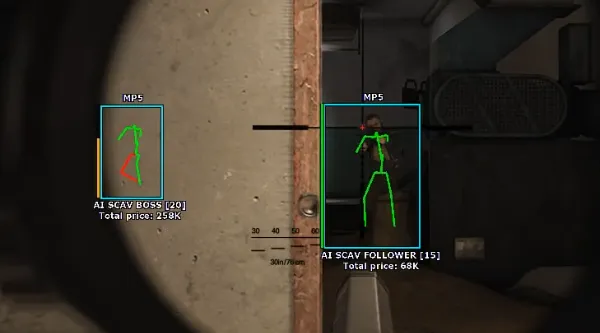
In Arena Breakout: Infinite a single unseen enemy around a corner on Armory or the TV Station can wipe out an hour of farming: you haul insurance, tapes and a rare case toward extract — and get dropped on the last few meters. Soft HUB ESP solves this before it happens: you move across the map already knowing who is nearby, where they are, and how dangerous they are.
The cheat shows players and bots through walls — 2D boxes, a skeleton with health-based coloring, the weapon in hands, nickname, distance and total inventory value. You instantly see who is carrying a top case with M995 ammo and expensive insurance, and who isn't worth engaging. A line to the target and corpse markers add context: it's clear where shots came from and where a fight just happened.
World ESP highlights containers, dropped weapons and grenades, attachments, ammo, equipment, food and meds. Filters by rarity, by price type and a minimum-price slider cut the visual noise — only what's worth leaving your route for stays in the HUD. Handy on loot runs when you don't want to waste time on empty crates.
The top-down radar gives you a read on the situation without turning the camera: distance, local direction, FOV angle, window size and dots are all adjustable. It matters in Dark zones and on the approach to extract, where every second of reaction counts.
The cheat works with the Steam launcher; the menu is in Russian and English. Purchase is standard: you pay, the key arrives by email within a few minutes, and activation follows the instructions (the instruction button is provided together with the key).
System Requirements
🔔 Cheat statuses update automatically from our Telegram bot via developer notifications — follow the news there. Many cheats update themselves after game changes, so a “Checking” status does not mean the cheat is broken — it is just uncertainty until confirmed. Not sure? Ask in the site chat or on our Contacts page.
Global keys — work worldwide.
Payment with a Binance card may be available for selected products. Contact us privately before buying to check availability and agree the details.
Features
Players & bots ESP
- 2D Box — box around PMCs and scavs through walls, with adjustable draw type and fill (blackout)
- Skeleton — model skeleton with health-based coloring or a plain mode
- Health bar — HP bar above the target to judge a finishing shot at range
- Weapon — the weapon in the target's hands
- Name — player nickname above the model
- Distance — distance to the target in meters
- Inventory price — total inventory value in tapes
- Line — line from the screen center to the target for bearing orientation
- Corpses — corpse markers on the map
Radar
- Enable — top-of-screen minimap with player, bot and loot markers
- Distance — radar range
- Local direction — markers rotate relative to your view
- Angle — FOV draw angle on the radar
- Size — radar window size on screen
- Point size — size of player and loot dots on the radar
Loot & world (World ESP)
- Containers — highlights containers, crates and safes on the location
- Weapons & grenades — dropped weapons and grenades on the ground
- Attachments — attachments and modules: suppressors, scopes, grips
- Ammo — ammo on the ground and in crates (BP, M995, 7.62 BT, etc.)
- Equipment — armor, helmets, rigs and backpacks (6B43, Altyn, etc.)
- Food & med — food, first-aid kits, IFAKs, tourniquets, painkillers
- Uncategorized — other loot: keys, documents and quest items
Loot filters
- Rarity select — filter items by rarity
- Price select — filter by price type: market or base
- Minimum price slider — minimum loot value slider for the HUD
* The feature list may be updated by the developer — keep an eye on the current version.
Customer Reviews
All reviewsFrequently Asked Questions
What features are included in Soft HUB ABI?
What payment methods are accepted?
How to contact support?
Payment is confirmed, but the product is missing. How long should I wait?
I have a key. Where are the download and instructions?
After payment you will receive detailed instructions on activation, launch and use of the software.
Instructions will be sent to the email address specified before payment.
You will also find a download link and necessary components for the software.
Cheat community
Cheat updates, detection status and help from other players — in our Telegram and Discord.