WarChill for Arena Breakout Infinite
WarChill — Private cheat for Arena Breakout: Infinite
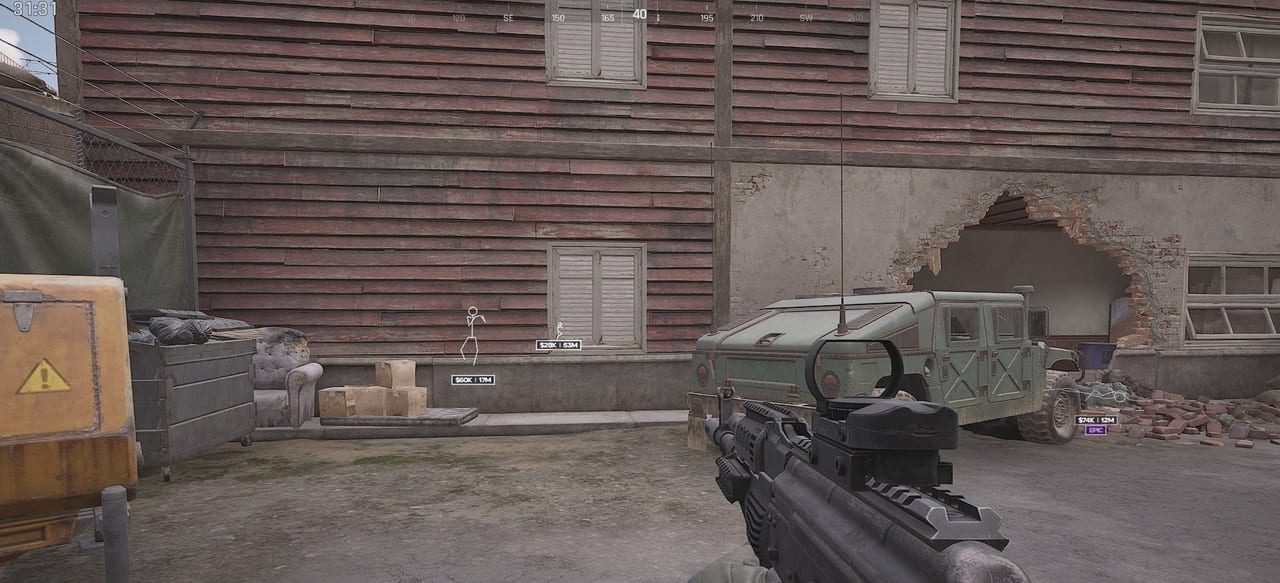
Looking for an Arena Breakout Infinite cheat with an advanced ESP and extra features that boost your awareness during raids? WarChill for Arena Breakout Infinite offers a toolset that helps you track opponents, evaluate loot value and navigate the map more effectively.
One of the key features of WarChill for ABI is its ESP system. This Arena Breakout Infinite cheat supports Bone ESP, which displays player skeletons, as well as Cash ESP, which shows the total value of the items enemies are carrying. This lets you quickly assess the potential value of targets and make more profitable decisions during a raid.
For extra information, the cheat uses an item rarity detection system. The display color changes depending on the highest rarity of an enemy's gear, letting you instantly identify the most valuable targets on the map. A visibility check is also available, changing enemy colors depending on whether they are in your direct line of sight.
Sniper Prediction deserves special attention. This feature accounts for your current weapon, the ammunition used, the distance to the target and its movement direction to calculate the bullet prediction point. This approach helps you use long-range weapons in Arena Breakout Infinite far more effectively.
WarChill for ABI also includes Smart Layers for correct target rendering, a Clean Screenshots system that hides the ESP on screenshots, streams and recordings via OBS or Discord, and an FPS Manager that keeps performance stable. Additional security is provided by a Kernel Bypass built on a dedicated Ring0 driver.
Important: pay attention to your Windows build. The cheat supports Windows 10–11 PRO x64 only on builds 1909–23H2. Before purchasing, make sure to check your system build (Win+R → winver) — other builds are not guaranteed to work.
System Requirements
Global keys — work worldwide.
Payment with a Binance card may be available for selected products. Contact us privately before buying to check availability and agree the details.
Features
Bone ESP
- Displays player skeletons
Color by item rarity
- White — common items
- Blue — rare items
- Purple — epic items
- Gold — legendary items
- Red — mythical items
Smart Layers
- Closer targets are drawn on top of distant ones
Clean Screenshots
- ESP is not visible on screenshots
- ESP is not visible on video recordings
- ESP is not visible in OBS
- ESP is not visible in Discord
FPS Manager
- FPS stabilization
- Reduced CPU load
Cash ESP
- Displays the total value of enemy items
Visibility check
- Red — target is not visible
- Green — target is visible
Players and bots split by color
- White — bots
- Red — enemy players
Sniper Prediction
- Accounts for the weapon
- Accounts for the ammunition
- Accounts for the distance
- Accounts for the target movement direction
- Displays the bullet prediction point
System
- Kernel Bypass
- Dedicated Ring0 driver
Multiprocessing Architecture
- Multiprocessing architecture
- Improved performance
- Improved security
Frequently Asked Questions
What features are included in WarChill?
What payment methods are accepted?
How to contact support?
Payment is confirmed, but the product is missing. How long should I wait?
I have a key. Where are the download and instructions?
After payment you will receive detailed instructions on activation, launch and use of the software.
Instructions will be sent to the email address specified before payment.
You will also find a download link and necessary components for the software.
Cheat community
Cheat updates, detection status and help from other players — in our Telegram and Discord.