Ghost Apex 용 Apex Legends
Ghost Apex — Aimbot, ESP, Loot, 레이더를 갖춘 Apex Legends 소프트웨어
개발자: Ghost
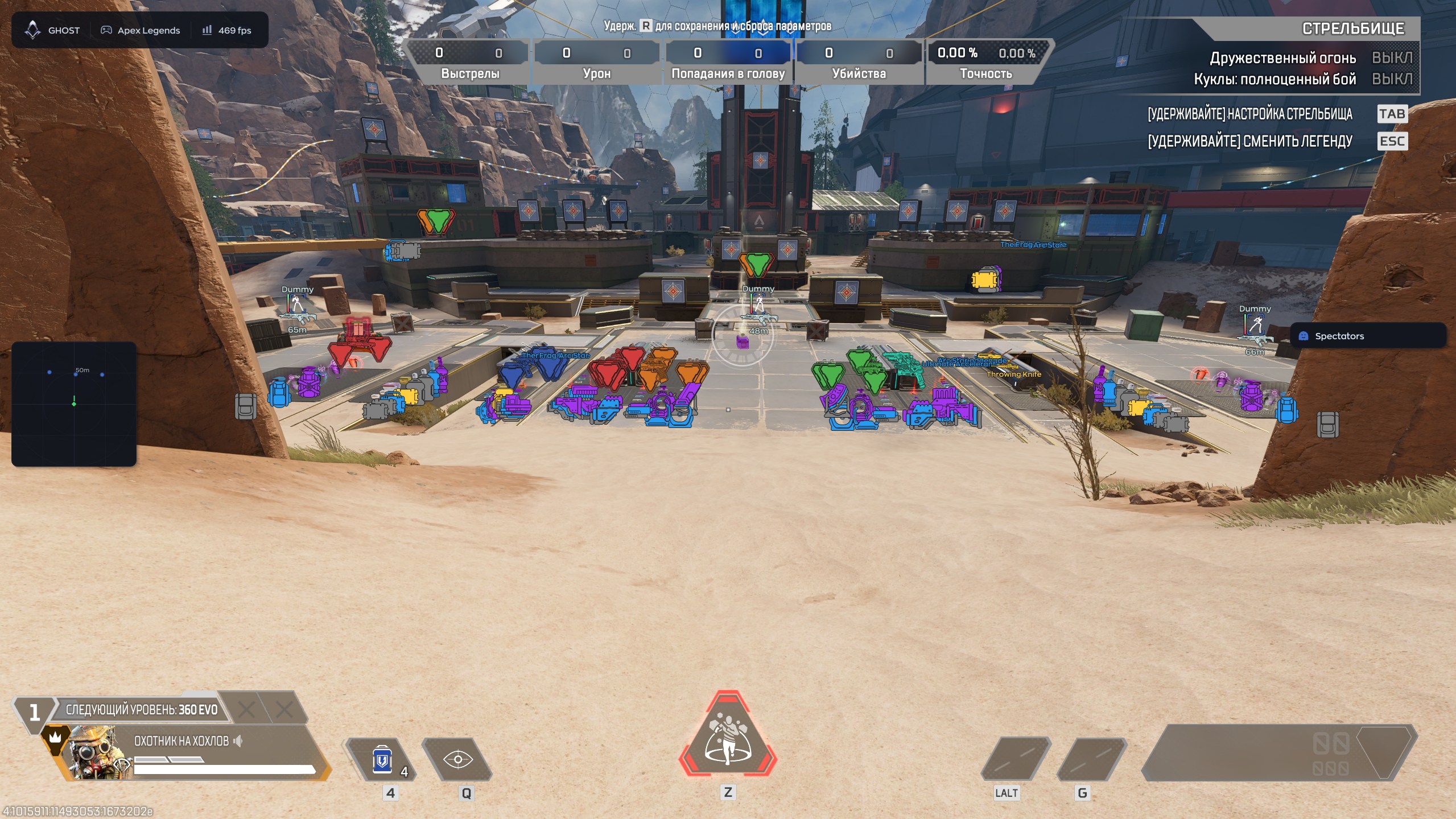
Ghost Apex는 Steam 버전 Apex Legends용 게임 소프트웨어입니다. 설정 가능한 aimbot, 플레이어 ESP, 전리품 표시, 화면 레이더와 설정 저장 시스템을 제공합니다. 1일, 7일, 30일 키를 선택할 수 있습니다.
시스템 요구사항
운영 체제
Windows 10 | 11 (All versions)
게임 클라이언트
Steam
프로세서
INTEL | AMD
게임 모드
창 모드 | 테두리 없음
Video Card
NVIDIA | AMD
Spoofer
없음
Usb Drive
필요 없음
게임 최신 패치: 2026년 8월 26일
작동 중 상세 상태
🔔 치트 상태는 개발자 알림에 따라 텔레그램 봇에서 자동으로 업데이트됩니다 — 그곳에서 소식을 확인하세요. 많은 치트는 게임 변경 후 스스로 업데이트되므로 «확인 중» 상태가 치트가 작동하지 않는다는 뜻은 아니며, 확인 전까지의 불확실성일 뿐입니다. 확실하지 않나요? 사이트 채팅에서 문의하거나 연락처를 확인하세요.
기능
AIMBOT — 조준
- Enable — turns the aimbot on or off
- Field of View — sets the target acquisition area
- Smooth — adjusts aiming smoothness
- Hitbox — selects the body area to target
- Bone Mode — selects a specific model bone
- Visible Check — targets visible opponents only
- Max Distance — limits the operating distance
- Prediction — accounts for target movement and bullet travel
- Recoil Control — compensates for weapon recoil
- Humanize — gives crosshair movement a more natural feel
- Jitter — adds configurable micro-movements
- Deadzones — areas where the aimbot does not adjust the crosshair
- Reaction Min / Max — minimum and maximum reaction delay
- Max Speed — limits maximum aiming speed
LOOT — 전리품
- Enable — turns loot display on or off
- Weapons — displays weapons
- Gear — displays armor, helmets and backpacks
- Healing — displays med kits, syringes and shield batteries
- Ammo — displays ammunition
- Attachments — displays sights, magazines and stabilizers
- Icon Size — adjusts icon size
VISUAL — 플레이어 ESP
- Box — draws a box around a player
- Legend Name — displays the opponent’s legend
- Player Name — displays the player’s nickname
- Skeleton — draws the model skeleton
- Distance — displays the distance to the target
- Snapline — draws a line from the player to the target
- Weapon — displays the opponent’s weapon
- Offscreen Arrows — points to enemies outside the visible area
- Health — displays player health
- Glow — highlights the player model
WORLD — 레이더
- Enable — turns the radar on or off
- Draw Outline — adds an outline around the radar
- Draw Background — enables the radar background
- Point Style — displays targets as dots, arrows or squares
- Size — adjusts the radar window size
- Max Distance — sets the maximum target display distance
- Point Size — adjusts marker size
- Zoom — changes the scale of the displayed area
SETTINGS — 설정
- Config System — manages configuration profiles
- Create / Delete / Save / Load — manages saved settings
- Menu — customizes the menu appearance
- Watermark — displays the product logo and name
- Keybind Indicator — shows active hotkeys
- Shadow Text — adds text shadows
- Hide From Capture — hides the product interface from screen capture
- Battle Mode — provides a simplified combat layout
- Crosshair — enables a custom crosshair
- Menu Key — selects the menu hotkey
- DPI Scale — adjusts the interface scale
메뉴 스크린샷

이것은 무엇을 의미하나요?
고객 리뷰
모든 리뷰자주 묻는 질문
Ghost Apex을(를) 사용하는 것이 안전한가요?
네, Ghost Apex은(는) 안전을 최우선으로 설계되었습니다. 최신 안티치트 우회 기술을 사용하며 정기적으로 업데이트합니다. 다만 100% 밴 방지 보장은 없으므로 별도 계정 사용을 권장합니다.
Ghost Apex을(를) 어떻게 설치하고 실행하나요?
구매 후 oplata.info 링크를 받게 되며, 설치 안내, 다운로드 링크, 활성화 키가 포함되어 있습니다. 단계별 가이드를 따르면 됩니다 — 설치는 보통 2-5분 정도 소요됩니다.
Apex Legends 업데이트 후에도 Ghost Apex이(가) 작동하나요?
매 Apex Legends 패치 후 Ghost Apex을(를) 신속하게 업데이트합니다. 업데이트는 보통 1-48시간 이내에 릴리스됩니다. 업데이트 중에는 구독이 동결되어 결제한 시간을 잃지 않습니다.
Ghost Apex에는 어떤 기능이 포함되어 있나요?
Ghost Apex의 기능 세트는 선택한 플랜에 따라 다릅니다. 일반적으로 Aimbot, ESP/Wallhack, Radar 등이 제공됩니다. 전체 기능 목록은 위의 상품 설명에 나와 있습니다.
어떤 결제 수단을 사용할 수 있나요?
이용 가능한 결제 수단은 결제 단계에서 결제 제공업체가 표시합니다. 상품과 지역에 따라 다르므로 결제 전에 지원팀에 세부 정보를 확인하세요.
고객 지원은 어떻게 문의하나요?
비공개 문의에 주문 번호, 상품과 에디션, 결제 플랫폼, 현재 단계, 오류와 시도한 단계를 포함하세요. 이미 정보가 있다면 기존 대화를 이어가세요. 키, 비밀번호, 로그인 코드, 결제 정보와 비공개 링크를 숨기고 주문 번호를 공개 채팅에 올리지 마세요. 지원 문의.
결제가 확인됐지만 상품이 없습니다. 얼마나 기다려야 하나요?
원래 주문 페이지를 여세요. 전달 방식과 시간은 상품 및 구매 조건에 따라 다릅니다. 자동 전달과 수동 처리는 다른 절차입니다. 안내된 시간이 지났거나 결제 확인 후에도 전달되지 않으면 판매자에게 주문 번호를 비공개로 보내세요. 결제 후 도움말.
키는 있습니다. 다운로드와 설명서는 어디에 있나요?
구매한 정확한 상품과 에디션의 설명서를 사용하세요. 상품 페이지 또는 주문 전달 내용에 링크가 있습니다. 키는 접근 정보이며 공통 다운로드 링크가 아닙니다. 해당 설명서나 주문에서 다운로드하세요. 링크가 없다면 다른 상품의 안내를 쓰지 말고 지원에 문의하세요. 결제 후 도움말.
결제 후 소프트웨어의 활성화, 실행 및 사용에 대한 자세한 안내를 받으실 수 있습니다.
안내는 결제 전 제공한 이메일 주소로 전송됩니다.
다운로드 링크와 필요한 구성 요소도 함께 제공됩니다.
치트 커뮤니티
치트 업데이트, 탐지 상태, 다른 플레이어의 도움 — 텔레그램과 디스코드에서.