Arcane Web Radar สำหรับ ARC Raiders
Arcane Web Radar — browser radar for ARC Raiders
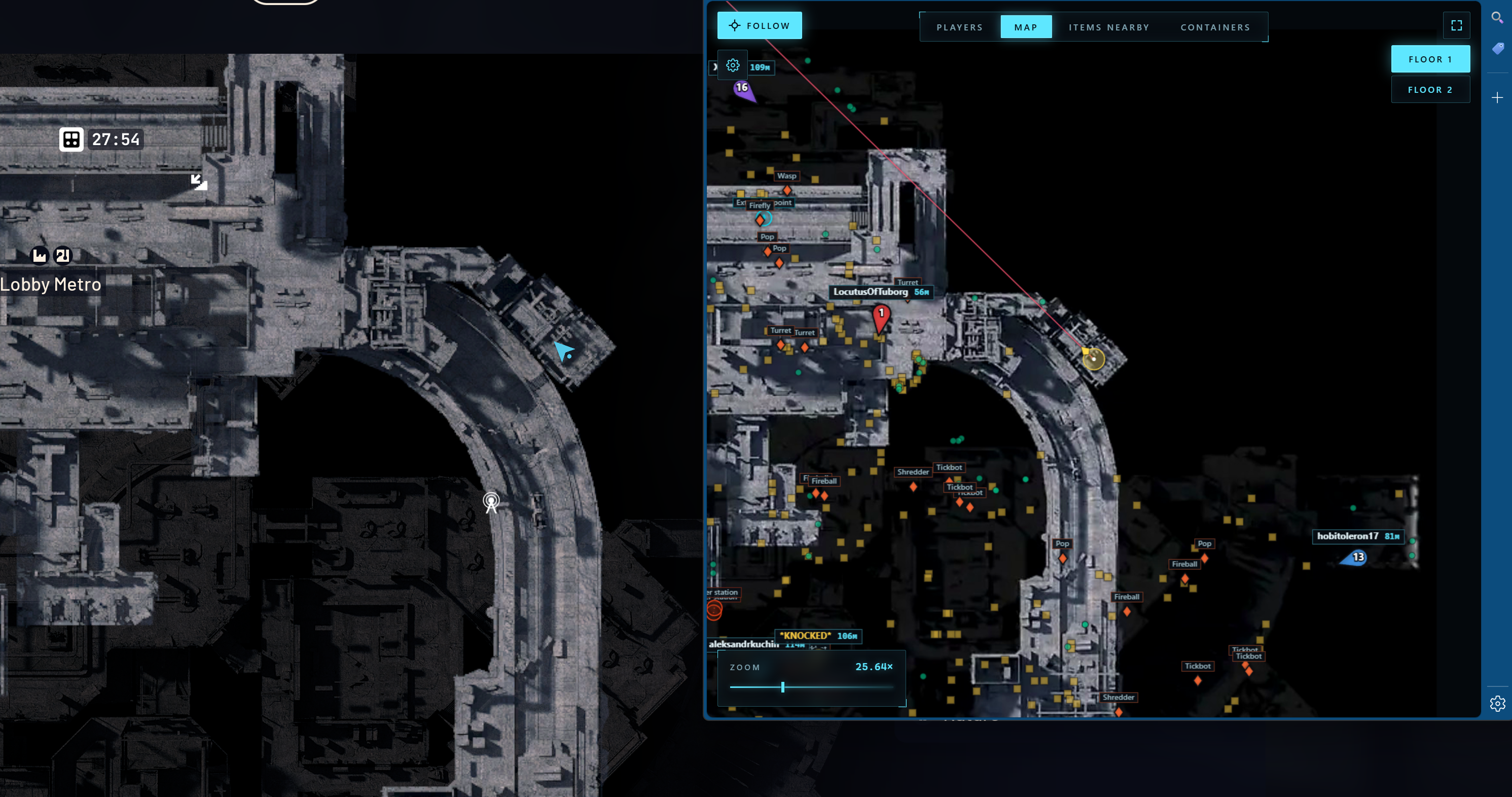
Arcane Web Radar for ARC Raiders is a private browser-based radar that displays all in-game data in a separate browser window instead of overlaying ESP on top of the game client. There are no boxes, skeletons or lines on your screen — the ARC Raiders client stays clean, while all the tactical information lives on a second monitor, phone or tablet.
The radar shows player and teammate positions with names, distances and weapons, ARC machines, containers, loot and key map objects: extraction points, supply call stations, supply stations, power stations, probes, mines, quest items, carryables and grenades. Every category has its own settings: font size, opacity, type filter.
On top of that there are Global Player, Nearby Items and Nearby Containers tables with search, sorting by distance and quick actions — mark on map, build a route to the target. Auto camera scaling and a follow mode for the local player or a specific teammate make team play especially comfortable.
Steam, Xbox and Epic Games versions are supported. The radar works in windowed, borderless and full screen modes. There is no injection into game memory — data is delivered to a separate web interface, which reduces risk and keeps cheat usage clean.
ข้อกำหนดระบบ
🔔 สถานะของโปรแกรมอัปเดตอัตโนมัติจาก บอต Telegram ของเรา ตามการแจ้งเตือนของผู้พัฒนา — ติดตามข่าวได้ที่นั่น โปรแกรมหลายตัวอัปเดตตัวเองหลังเกมเปลี่ยนแปลง ดังนั้นสถานะ «กำลังตรวจสอบ» ไม่ได้แปลว่าใช้งานไม่ได้ เป็นเพียงความไม่แน่นอนจนกว่าจะยืนยัน ไม่แน่ใจ? สอบถามที่ แชทบนเว็บไซต์ หรือดู ติดต่อ
คีย์ Global — ใช้ได้ทั่วโลก
สินค้าบางรายการอาจชำระด้วยบัตร Binance ได้ โปรดส่งข้อความส่วนตัวหาเราก่อนซื้อเพื่อตรวจสอบและตกลงรายละเอียด
คุณสมบัติ
ผู้เล่น
- แสดงทีม (ความสามารถในการแสดงสมาชิกในทีมทั้งหมดหรือเฉพาะสมาชิกเท่านั้น)
- หมายเลขทีม
- สีทีม
- ชื่อเล่น
- ระยะทาง
- ชื่ออาวุธ
- แสดงเส้นจุดมุ่งหมาย
- ขนาดผู้เล่น
ตู้คอนเทนเนอร์
- แสดงภาชนะ
- เปิดซ่อนแล้ว
- แสดงชื่อ
- แสดงระยะทาง
- ขนาดตัวอักษร
- ความทึบ
- ตัวเลือกประเภท
เบ็ดเตล็ด
- แสดงเส้นจุดมุ่งหมาย
- ปรับขนาดอัตโนมัติ
- ติดตามผู้เล่นท้องถิ่น
- ความสามารถในการติดตามสมาชิกในทีมโดยเฉพาะ
ตารางผู้เล่นทั่วโลก
- หมายเลขทีม
- ชื่อ
- อาวุธ
- สุขภาพ
- ระยะทาง
- การดำเนินการ: แสดงบนแผนที่, เส้นทางไปยังผู้เล่น
ตู้คอนเทนเนอร์ใกล้โต๊ะ
- สถานะ (เปิด / ปิด)
- ชื่อ
- ประเภท
- ระยะทาง
- การดำเนินการ: แสดงคอนเทนเนอร์บนแผนที่ เส้นทางไปยังคอนเทนเนอร์
ARC
- แสดง ARC
- แสดงชื่อ
- แสดงระยะทาง
- ขนาดตัวอักษร
รายการ
- แสดงรายการ
- แสดงชื่อ
- แสดงระยะทาง
- ขนาดตัวอักษร
- ความทึบ
- ตัวเลือกหมวดหมู่
วัตถุ
- แสดงชื่อ
- แสดงระยะทาง
- ขนาดตัวอักษร
- ความทึบ
- จุดสกัด
- จัดหาไมโครโฟนประกาศ
- สถานีจัดหา
- สถานีไฟฟ้า
- โพรบ
- ของฉัน
- ภารกิจ
- พกพาได้
- ระเบิดมือ
รายการใกล้เคียงตาราง
- ค้นหารายการใกล้เคียง
- ชื่อ
- ระยะทาง
- การดำเนินการ: แสดงรายการบนแผนที่ เส้นทางไปยังรายการ
รีวิวจากลูกค้า
รีวิวทั้งหมดคำถามที่พบบ่อย
Arcane Web Radar มีฟีเจอร์อะไรบ้าง?
รับชำระเงินด้วยวิธีใดบ้าง?
ติดต่อฝ่ายสนับสนุนอย่างไร?
ยืนยันเงินแล้วแต่ไม่มีสินค้า ต้องรอนานแค่ไหน?
มีคีย์แล้ว ดาวน์โหลดโปรแกรมและคู่มือที่ไหน?
หลังชำระเงิน คุณจะได้รับคำแนะนำละเอียดเกี่ยวกับการเปิดใช้งาน เริ่มต้น และใช้งานซอฟต์แวร์
คำแนะนำจะถูกส่งไปยังอีเมลที่ระบุก่อนชำระเงิน
คุณยังจะพบลิงก์ดาวน์โหลดและส่วนประกอบที่จำเป็น
ชุมชนผู้ใช้ตัวช่วย
อัปเดตตัวช่วย สถานะการตรวจจับ และความช่วยเหลือจากผู้เล่นคนอื่น — ใน Telegram และ Discord ของเรา