Byster Albion for Albion Online
Cheat BYSTER for Albion Online — ESP, Radar, and Loot Display

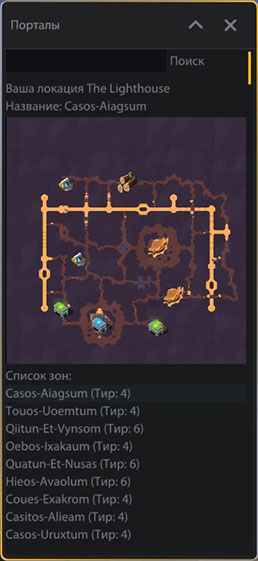
BYSTER CHEAT is a specialized ESP cheat for Albion Online that helps you efficiently farm resources, find players and mobs, and navigate Avalon zones. The cheat shows all loot types with customizable colors, displays players and mobs on the radar, and provides an Avalon portal map with zone search. The system works stably and is updated for new game versions.
Major update: added an auto-route system with auto-movement and route recording, auto resource gathering, auto-fishing along the route, a transport bot between cities, and ESP for player equipment, spells, and cooldowns.
System Requirements
Global keys — work worldwide.
Payment with a Binance card may be available for selected products. Contact us privately before buying to check availability and agree the details.
Features
AUTO-ROUTE
- Auto-movement
- Route display
- Route point radius setting
- Move with left mouse button
- Route recording
- Route start and pause
- Route stop
- Mount support
- Saved routes
- Apply a saved route
- Route renaming
- Route deletion
TRANSPORT BOT
- Departure and destination city selection
- Start only from a bank
- Departure bank selection
- Travel between cities
- Destination bank selection
- Bank calibration
COLOR SETTINGS
- Loot colors (wood, ore, stone, leather, cotton)
Current location mini-map display
- Information about location and zone name
- List of available zones with tier
KEY FEATURES OF BYSTER CHEAT
- Professional ESP system for Albion Online
Full loot and resource display
- Map of Avalon portals with zone search
Customizable colors and radiuses
- Compatible with Steam and Game Launcher
Working in windowed game mode
- Supports Windows 10 and Windows 11
- Regular updates for new versions of the game
AUTO RESOURCE GATHERING
- Gathering radius setting
- Resource filter via ESP
- Skip dangerous mobs
- Return to route
- Stuck resource blocking
- Auto-eat
AUTO-FISHING ON ROUTE
- Fishing along the route
- Fish detection at 17 m
- Auto-cast
- Auto-hook
- Auto-reel
- Auto-repeat
- Fish the entire spot
- Move to the next spot
- Return to route after fishing
PLAYER ITEM, SPELL & COOLDOWN ESP
- Player equipment display
- Player spells display
- Cooldown display
- Icon size setting
- Icon position setting
- X / Y offset
T4 and T6 zone support
- Firos-Osinsum (T6)
- Hebos-Ulamsum (T6)
- Coues-Exakrom (T4)
- Oebos-Ixakaum (T4)
- Fieos-Aiuttum (T6)
- Cetos-Obaelos (T6)
- Tetos-Igaelum (T6)
- Xurites-Ataglos (T6)
- Quaent-Al-Vynsum (T6)
GENERAL
- ESP system for Albion Online
- Player, mob and crystal mob display on map
- Wisp, dungeon and underground display
- Radar with customizable size, ESP radius with adjustable slider
- Battle mode
- Loot display for all tiers (tree, ore, stone, leather, cotton)
- Loot quality and resource type filtering
- Customizable detection radiuses
- Player, mob, crystal mob and wisp colors
- Color scheme and element transparency
- Avalon portals map with zone search
- T4 and T6 zone support
- Windowed game mode
Frequently Asked Questions
What features are included in Byster Albion?
What payment methods are accepted?
How to contact support?
Payment is confirmed, but the product is missing. How long should I wait?
I have a key. Where are the download and instructions?
After payment you will receive detailed instructions on activation, launch and use of the software.
Instructions will be sent to the email address specified before payment.
You will also find a download link and necessary components for the software.
Cheat community
Cheat updates, detection status and help from other players — in our Telegram and Discord.