Mira for Albion Online
Mira cheat for Albion Online — radar, tier loot display, color customization
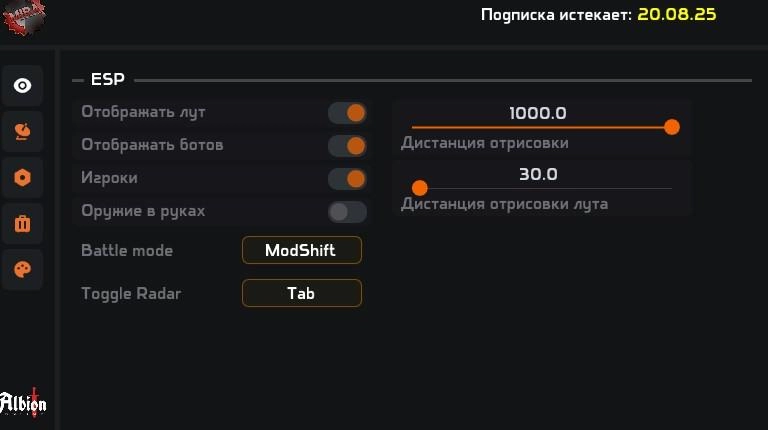
The Mira cheat for Albion Online is a private third-party tool that adds a radar and advanced object display settings to the game. The radar shows players, bots (mobs), resources and mists with adjustable scale, size and X/Y position of the radar window.
The build supports a Battle mode (ModShift by default) and a quick radar toggle hotkey (Tab). Loot is configurable per tier — T1, T2, T3, T4, T5, T6, T7, T8 — each tier can be toggled independently. Mists, mobs, players and resources have individual color settings for clear visual separation.
The cheat runs on Windows 10 / Windows 11 (Pro), supports Intel and AMD CPUs, and works in Windowed and Borderless modes. No built-in spoofer or OBS bypass — the anti-cheat is in-game.
System Requirements
Global keys — work worldwide.
Payment with a Binance card may be available for selected products. Contact us privately before buying to check availability and agree the details.
Features
Radar
- Display players (toggle)
- Display bots / mobs (toggle)
- Display weapon-in-hand indicator
- Display loot (toggle)
- Radar scale (size)
- Radar X / Y position
- Drawing distance for objects (slider)
- Drawing distance for loot (slider)
- Battle mode hotkey (default: ModShift)
- Toggle radar hotkey (default: Tab)
Loot by tier
- T1 Loot (toggle)
- T2 Loot (toggle)
- T3 Loot (toggle)
- T4 Loot (toggle)
- T5 Loot (toggle)
- T6 Loot (toggle)
- T7 Loot (toggle)
- T8 Loot (toggle)
Colors
- Mists color
- Mobs color
- Players color
- Resources color
Frequently Asked Questions
What features are included in Mira?
What payment methods are accepted?
How to contact support?
Payment is confirmed, but the product is missing. How long should I wait?
I have a key. Where are the download and instructions?
After payment you will receive detailed instructions on activation, launch and use of the software.
Instructions will be sent to the email address specified before payment.
You will also find a download link and necessary components for the software.
Cheat community
Cheat updates, detection status and help from other players — in our Telegram and Discord.