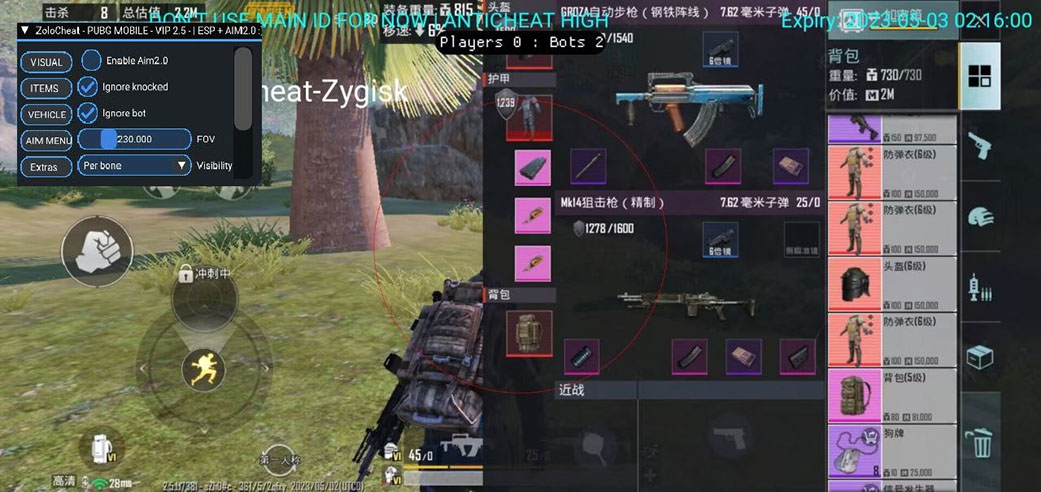
For non-rooted Android devices, this comparison covers Zolo, Impact, and Shield. Zolo lists enemy visuals and automatic aiming, Impact names Silent Aim, Instant Hit, No Spread, and ESP with Visible Check, while Shield combines weapon and vehicle ESP with controls for aiming distance, radius, and mode. Aquila addresses a separate setup: Windows with 32-bit GameLoop.
The available facts do not establish a universal winner. Start with the platform and operating-system version, then compare login methods, exact features, and access periods. Impact requires special attention because its Android range is inconsistent: the description says Android 9–14, while the requirements and feature list say Android 9 and above. Android 15+ is therefore unconfirmed. Check current status and compatibility before paying and again before launch. Account risk cannot be excluded because the product cards refer to blocking probability, account protection, and user reports.
Verified differences at a glance
The PUBG Mobile software catalog shows the available game-level selection. The four products covered here differ by platform, named functions, and access duration.
| Product | Platform and requirements | Listed functions | Access periods |
|---|---|---|---|
| Zolo | Android 9+, no root required | Wallhack, enemy location, automatic aiming, target body-part selection | 24 hours; 3, 7, 14, 30, or 60 days |
| Impact | Description: Android 9–14; requirements and features: Android 9+. No root required; Android 15+ is unconfirmed | Mouse Aim, Silent Aim, Instant Hit, No Spread, recoil compensation, ESP with Visible Check | 24 hours; 7 or 30 days |
| Shield | Android, no root required; Android version not stated | Player, weapon, distance, and vehicle ESP; aiming distance, radius, and mode | 24 hours; 7 or 30 days |
| Aquila | Windows 10/11 up to 23H2, 32-bit GameLoop | Aimbot, player information, radar, loot data, overlay settings | 24 hours; 3, 7, or 30 days |
The initial choice is primarily about the actual device. Aquila is listed for a PC emulator configuration, whereas Zolo, Impact, and Shield are Android products. Requirements must not be transferred between entries: for example, Shield’s unspecified Android range cannot be inferred from the ranges given for Zolo or Impact.
Zolo: Android without root, wallhack, and automatic aim
The Zolo Android product page specifies Android 9 and above with no root requirement. Its listed login methods are Twitter, Facebook, guest, phone number, and email.
Zolo’s Wallhack group includes enemy visualization, seeing through walls, and precise enemy location. Its Aimbot group names automatic aiming and target body-part selection. It can be shortlisted when those visual and aiming functions are required on Android rather than through a PC emulator.
The product also has several access periods: 24 hours, 3 days, 7 days, 14 days, 30 days, and 60 days. Within this comparison, only Zolo lists 14-day and 60-day options. A suitable duration does not establish current product status, so technical compatibility still needs to be checked before purchase.
Impact: named shooting functions and listed game editions
The Impact PUBG Mobile listing contains conflicting Android information. Its description limits operation to Android 9–14, while the requirements and one feature say Android 9 and above. The shared, non-conflicting interval is Android 9–14. Compatibility with Android 15 or later is not established and must be confirmed separately. The product card says root is not required.
Impact lists Mouse Aim, Silent Aim, Instant Hit, No Spread, Small Crosshair, and Recoil Compensation. ESP with Visible Check is named in the visual section. Mod Skin and automatic target detection are also included. These are concrete selection criteria, but they do not prove that Impact has a wider or more detailed aiming system than Shield or any other product.
The listing separately names PUBG Mobile, PUBG Mobile Lite, PUBG Mobile Global, and PUBG Mobile KR. This helps with the initial edition-based shortlist, but it does not confirm compatibility with every current game build. The exact edition and build should still be checked before payment and launch.
Twitter, Facebook, guest, phone number, and email are listed as login methods. Available periods are 24 hours, 7 days, and 30 days.
Shield: vehicle ESP and configurable aiming parameters
The Shield product card confirms Android and states that root is not required. It does not give a minimum or maximum Android version, so compatibility with a particular device must be verified before purchase.
Shield’s ESP group covers skeletons, weapons, distance, enemy locations, and vehicles. Its Aimbot section lists aiming distance, target body part, aiming radius, aim mode, and ignoring downed bots. Recoil compensation and a small crosshair appear under miscellaneous functions.
The recorded login methods are Twitter, Facebook, guest, and email. Phone-number login does not appear in the list, but that omission is not proof of incompatibility. Its status should be checked if that login method is required. Access periods are 24 hours, 7 days, and 30 days.
Shield belongs on the shortlist when vehicle or weapon information and the named aiming parameters match the intended use. That indicates feature fit rather than overall effectiveness.
Aquila: Windows with 32-bit GameLoop
The Aquila PUBG Mobile page describes a PC emulator setup. Its requirements specify Windows 10 or Windows 11 up to 23H2 and 32-bit GameLoop. Phone use, BlueStacks, 64-bit GameLoop, and later Windows versions are not confirmed by the supplied product information.
Aquila’s Aimbot section includes enabling the function, avoiding targets behind walls, bone display, Aim FOV, and smoothness. Visual functions cover players on and off screen, bots, distance, and spectator count. Both localized cards also contain skeleton, head, box, lines, radar, dead inventory, weapons, modules, equipment, and medicines. Listed settings include AntiScreen, vertical sync, overlay border, and resource-consumption information.
Available periods are 24 hours, 3 days, 7 days, and 30 days. Aquila should only be considered when the actual Windows version, emulator, and emulator architecture match the stated setup.
Choosing by use case rather than rank
The following scenarios provide a practical shortlist:
- Android 9 or later with wallhack and body-part selection: Zolo lists enemy visualization, automatic aiming, and target body-part selection.
- Silent Aim, Instant Hit, No Spread, or Visible Check is required: these functions are listed for Impact. Android 15+ remains unconfirmed because of the inconsistent range data.
- Vehicle and weapon information matters: both elements are included in Shield’s ESP list.
- Aiming distance, radius, and mode need to be listed explicitly: Shield names all three parameters.
- PUBG Mobile Lite, Global, or KR is used: Impact explicitly lists these editions, although the current build still needs verification.
- The game runs through 32-bit GameLoop on Windows: Aquila matches that scenario if Windows stays within the stated limit of 23H2.
- Access beyond 30 days is needed: only Zolo lists a 60-day period.
- A three-day period is preferred: Zolo and Aquila include that option.
This method compares documented fit. It does not rank products by safety, results, or blocking probability because the available information does not provide a shared testing method for such conclusions.
Checks to complete before purchase
Use the following checklist after identifying a possible match:
- Platform: determine whether the setup uses Android directly or Windows with GameLoop.
- Operating-system version: Zolo states Android 9+, while Shield gives no Android range. Impact’s description says Android 9–14, but other fields say 9+; Android 15+ is therefore unconfirmed. Aquila lists Windows 10/11 only up to 23H2.
- Root and emulator requirements: Zolo, Impact, and Shield state that root is not required. Aquila requires 32-bit GameLoop.
- PUBG Mobile edition: Lite, Global, and KR are named for Impact, but current-build compatibility still needs confirmation.
- Login method: compare the account’s method with the list on the relevant product card.
- Exact function: look for the required item, such as Silent Aim, Visible Check, vehicle ESP, or radar, rather than relying only on broad ESP or Aimbot labels.
- Access period: select a duration only after technical fit has been established.
- Current status: a catalog feature list does not establish availability at launch time. Verify status and compatibility immediately before payment and each use.
Risk-aware conclusion
Zolo fits an Android 9+ shortlist built around wallhack, automatic aim, and multiple duration choices. Impact should be evaluated through its named functions—Silent Aim, Instant Hit, No Spread, and Visible Check—while accounting for the Android-range conflict; Android 15+ is not confirmed. Shield lists vehicle and weapon ESP plus several aiming controls, but does not state a supported Android range. Aquila is tied to the specified Windows and 32-bit GameLoop configuration.
This comparison can rule out mismatched platforms and unnecessary feature sets, but it cannot remove account risk. The cards themselves mention blocking probability, account protection, and reports, so promotional statements should not be treated as guarantees. Confirm current product status, game build, operating system, login method, and actual compatibility before paying and again before launch.
Dominate PUBG Mobile with our software
Statuses update automatically; ambiguous cases are reviewed manually. Sales may be paused during extended updates.